Holiday grocery store execution: How to keep plans intact through the peak
Nov 23, 2026 • 13 min
Grocers can spend months perfecting a holiday plan. It won’t matter if stores can’t execute it when demand peaks.
Holiday plans are locked in months ahead, but store conditions change by the hour. No forecast predicts how traffic will move on a given Saturday or which item a social media trend will push. No labor schedule predicts how many people will call in sick the week before Christmas.
But holiday peaks don’t create completely new store problems. They magnify the everyday execution gap — the distance between what headquarters plans and what stores deliver.
Shoppers notice that gap immediately. An empty shelf on a regular weekday costs a sale; the week before Christmas, it can cost the customer. A 2026 Coresight Research survey of US retailers, sponsored by RELEX Solutions and Simbe, found that in-store inefficiencies cost 6.4% of gross sales, up from 4.5% in 2024.
No grocer wants an unhappy customer. But grocers who invest in planning and neglect store execution risk disappointing customers when a bad experience is hardest to forget. Avoiding that takes store operations software that walks staff through each task and feeds what actually happened into the next plan.
Why grocers struggle with holiday peaks at the store level
During the holiday peak, stores handle more volume, with more temporary staff and less time, than at any other point in the year. Under that pressure, small breakdowns between headquarters and the shop floor turn into empty shelves and wasted product.
Three factors widen the execution gap at the holiday peak:
1. Push and pull operating models change where execution problems surface
Where execution breaks down depends on who places the orders. Most US grocers use a store-pull model, where stores place their own orders, especially for fresh products. In a store-pull model, store ordering decisions are part of execution, so ordering errors widen the gap.
But many European grocers use a centralized push model, in which headquarters generates orders and stores carry them out. In a push model, the order is set before it reaches the store, so problems show up after delivery. They surface in receiving, in shelving, and in how quickly stores react when local demand doesn’t match the plan. A mismatch cuts both ways: too much stock turns into waste, and too little leaves shelves empty.
2. Seasonal staffing breaks the routines stores depend on
Grocers need more hands at peak, and the extra help changes how work gets done. US grocers hire temporary workers for the holidays, and some UK grocers send headquarters staff to work in stores through the Christmas rush. These volunteers often bring years of retail experience. What they don’t know is how a particular store runs: where stock is kept, which tasks come first, or how the team handles a delivery.
Volunteers also change the team dynamic, because store staff act differently when someone from headquarters is on the floor. Each new worker, whether a temporary hire or a volunteer, brings a slightly different way of doing the job. But store routines depend on everyone doing tasks the same way, so consistency drops just as volume peaks.
3. Disconnected systems keep headquarters from seeing what stores actually do
Planning and store execution usually run in separate systems. Tasks reach stores through paper lists, emails, messaging apps, and the company intranet, or get passed along by long-serving staff who know from experience how the store runs. No single system assigns, tracks, or confirms the work. Headquarters often learns that a promotion wasn’t set up or a reset didn’t happen only after sales results come in.
How grocers can keep holiday execution on plan
None of the three factors behind holiday store struggles goes away at peak. Operating models, seasonal hiring, and store systems are set long before the holidays, so grocers can’t remove the volume, staffing, and time pressure that comes with the peak. What they can do is make the work that happens under that pressure more reliable, one area of the store at a time.
Seasonal resets: Keep holiday displays on plan
Holiday displays drift off plan because headquarters usually designs seasonal resets centrally, while stores have to build and maintain them under peak conditions.
Resets usually arrive as full layouts with no guidance on what order to work in. And the team restocking a display in December is rarely the team that built it, so staff end up refilling a layout they’ve never seen.
Promotional displays add a deadline. An end cap (the display at the end of an aisle) that isn’t set up before a holiday weekend means the promotion runs without the display meant to drive its sales. The tightest deadline often comes on Christmas Eve, when stores reset their range and promotions to swap Christmas products for New Year’s Eve party items.
Deadlines like that leave no room for stores to work out a reset as they go. The reset has to arrive ready to execute, so whoever is on shift can pick it up and finish it correctly. Four practices keep holiday displays closer to plan:
- Send stores the changes, not just the new layout. Show what moved, what was added, and what was removed. If a holiday end cap must be ready for Friday’s first shoppers, staff need to know on Thursday what comes down and what goes up.
- Give large resets a work order. Tell stores which displays to build first, so the most important seasonal space is ready before the first busy weekend.
- Keep the planogram at the shelf. The associate restocking a display should be able to check the layout on the spot, especially if someone else built it.
- Confirm completion before the promotion starts. Stores should report when a reset or promotional display is done or blocked, so headquarters can step in before the sales window opens.
Phantom inventory: Fix inventory records before shelves go empty
Phantom inventory is stock that an inventory system records as on hand but that isn’t actually on the shelf. Automated replenishment systems trust the recorded number, so phantom inventory blocks reorders for the items selling fastest during the holiday peak.
Every replenishment order is based on a simple equation: forecast demand minus inventory on hand. Most holiday planning effort goes into improving the forecast, but a better forecast still produces the wrong order if the on-hand number is wrong. ECR Retail Loss research has found that about 60% of retail inventory records are wrong at any given time.
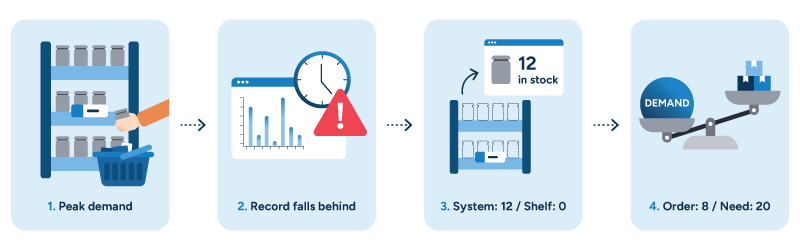
The holidays make inventory records less reliable. Receiving areas are congested, so deliveries reach the shelf before staff record them, and no one has time to count during the rush.
Fresh adds its own errors: Products bought by the case and sold by weight break unit counts, and shoppers pick the freshest stock first. The result is a fresh department with stockouts and spoilage at the same time, both caused by the same bad records. Ordering more — the usual answer to empty shelves — only adds to the waste.
Grocers can’t run full inventory counts during the peak, but they can count smarter with five practices:
- Watch for stock with no sales. When the system shows stock on hand but sales of that item suddenly stop, the shelf is probably empty and automatic reorders are blocked.
- Count fast-selling items first. Focus checks on best-selling seasonal items instead of trying to count every stock-keeping unit (SKU).
- Correct inventory records continuously. Waiting for the next scheduled count means placing orders based on inaccurate data for days or weeks.
- Record deliveries when they arrive. A replenishment system can’t account for stock that staff didn’t record at receiving.
- Base orders on current data, not last year’s habits. This year’s promotions and store traffic will differ from last year’s.
In-store production planning: Produce to demand in bakery and deli
Bakery and deli teams know holiday items will sell more, but the hard part is knowing how much to produce and when.
Many stores run in-store production on a fixed routine, such as baking 12 croissants at 7 a.m. every day. On the Friday before a holiday, that routine fails in both directions. Underproduction empties the bakery case by mid-morning, while overproduction sends product, and the labor used to make it, into the trash at closing.
Peak days also bring constraints the routine ignores. Prepared foods may need the same oven, a baker may be out sick, or a delivery may arrive late.
Bakery and deli teams that handle peak days well follow four practices:
- Plan production for each store based on expected demand, rather than copying last year’s totals.
- Split production into batches throughout the day, so trays refill when shoppers actually buy.
- Resolve shared-equipment conflicts in advance. When bakery and prepared foods need the same oven, set priorities based on shelf life and margin before the morning rush.
- Schedule backward from when products need to be on the shelf. Donuts due on the counter at 7:45 a.m. that take eight hours to defrost must leave the freezer the night before. Staff shouldn’t be doing that math at the last minute on the busiest day of the year.
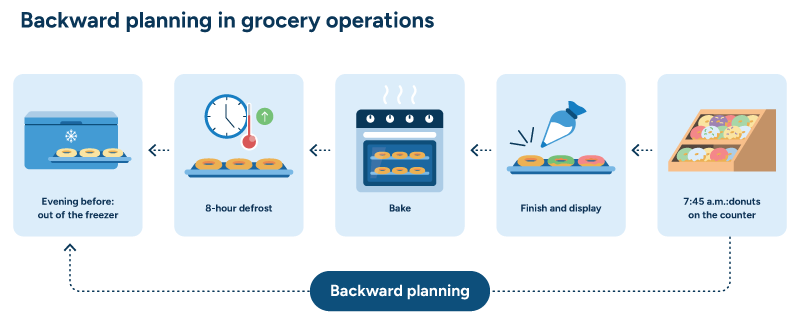
The goal is full display cases throughout the rush, without wasting product or overusing the staff on shift.
READ MORE: In-store production: Stop paying the price for disconnected planning
Fresh markdowns: Protect margin after the holiday rush
Grocers lose much of their holiday margin after the holiday ends. Fresh products ordered for peak demand tend to reach their expiration dates at the same time once the rush is over.
Most stores clear surplus fresh stock with fixed markdown rules, such as 25% off on day one and 50% off on day two. Fixed rules discount fast-selling items that didn’t need a discount and still let slow-selling items expire.
Holiday promotions and manual date checks make clearing that stock harder still. A markdown on a promoted item has to start from the promotional price. And a manual date check means walking every shelf in time, so at peak, products get missed or found too late to mark down.
Five practices make post-holiday markdowns more reliable:
- Check expiration dates early, before products reach their last day of sale.
- Time markdowns to store traffic, so shelves clear before the next delivery arrives.
- Set each markdown based on how the item is actually selling, instead of applying one rule to every product.
- Start from the promotional price on promoted items, so a markdown actually lowers the price customers would already pay.
- Record the outcome for every item: what sold at full price, what sold at a discount, and what was donated or thrown away.
Recording outcomes is the most important of these practices. Without a record of what happened, next year’s holiday plan repeats the same over-order.
Why grocery holiday peaks require unified planning and store execution
Holiday plans hold up when central planners and store teams work from the same data and the same guided workflows, whether orders come from headquarters or from the store. Plans reach the floor as prioritized tasks, and what actually happens in the store flows back into the next plan.
Many software tools reduce waste or improve order accuracy in one part of the store, and task management apps connect headquarters with stores. Both types of tools are useful. But holiday performance depends on decisions about what to order, what to produce, and what to mark down — and each of those decisions affects the others. Connecting task lists alone doesn’t connect those decisions.
Effective store tasks take staff straight to the work, instead of only sending a reminder. A checklist that says what to do still leaves the store to work out how.
| Task | What the task should open |
| Count | The flagged items, ready to count |
| Markdown | The item and its recommended discount |
| Production | The recipe and the quantity to make |
Guided tasks also help temporary holiday staff. When a workflow walks every employee through the same steps, a new hire can complete a task as well as a long-tenured employee, with minimal training.
Disconnected systems let small errors grow during the peak. A missed display leads to an empty shelf, a production miss leads to an empty bakery tray, and an over-order leads to a surplus that has to be marked down. Connected systems let each step correct the next one. Results also flow back to headquarters, so what sold, what was wasted, and where the store fell short inform the next peak’s plan.
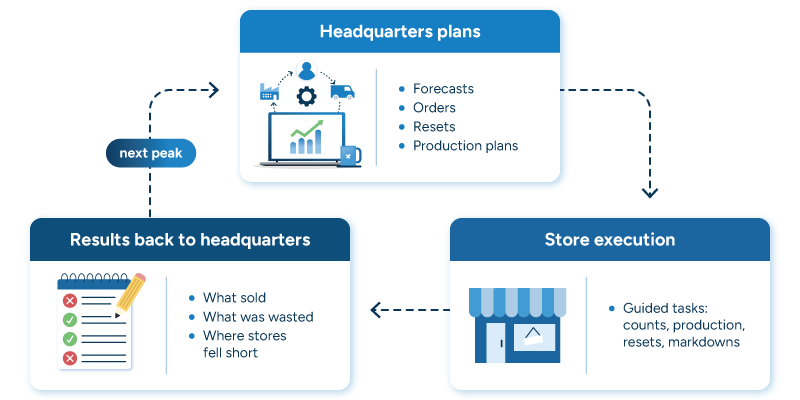
How RELEX Store Operations keeps stores on plan through the holiday peak
Connecting planning and store execution is exactly what RELEX Store Operations was built to do. RELEX designed it with people who have worked grocery shop floors. And it’s built around the needs described above: plans that reach the floor as guided work, inventory records stores can trust, and results that flow back into the next plan.
RELEX Store Operations runs on a single, shared model of the store. The model connects products, inventory, orders, production plans, store space, and staff. AI agents handle routine work, such as order proposals, inventory anomalies, expiry flags, and production adjustments.
Store teams review the exceptions and make the decisions that require human judgment. All of this work happens in one application, built on two decades of RELEX retail planning experience. Because every module shares that model, a correction in one part of the store informs the next decision in another.
Keeping seasonal resets and displays on plan
Holiday resets drift off plan when stores can’t see what changed or tell headquarters when the work is done.
RELEX Store Planograms is designed to close both gaps: It delivers seasonal resets to every store and shows what changed from the previous layout. Store teams report back to headquarters when a reset is complete or blocked, so regional teams can see which stores are behind before the holiday weekend.
Keeping inventory accurate and shelves stocked
Phantom inventory builds up because records drift between counts, and no store can count everything at peak.
To catch that drift without a full count, RELEX True Inventory continuously recalculates on-hand stock from sales, deliveries, and shrink patterns between physical counts. True Inventory flags anomalies, including items that show stock but no sales, and sends count tasks only where staff need to check. Because True Inventory runs on the same platform as ordering, each corrected stock balance updates the next order.
But an accurate on-hand number is only half of a good order. The other half is a forecast that fits fresh. RELEX Fresh Store Ordering builds forecasts specifically for fresh categories, accounting for short shelf life, weather, and substitution between product varieties. Each order recommendation weighs the cost of a stockout against the cost of spoilage.
RELEX Store Operations applies the same approach to center-store and ambient products, so the whole store orders from one workflow. Staff review only the order lines that need a decision, not the whole department.
RELEX Store Operations also handles receiving, including direct store delivery (DSD), so staff can record deliveries against orders and log discrepancies. Recording each delivery as it arrives closes the receiving gap that builds phantom inventory at peak, so the next order starts from stock the store actually has.
Producing to demand in bakery and deli
Production misses happen when output is planned from habit instead of from demand and the day’s constraints.
To plan from both, RELEX In-Store Production Planning converts the demand forecast into a production plan by department, product, and time of day. In-Store Production Planning schedules backward from when products need to be on the shelf, including defrost and proofing time, and alerts staff when to start each step. The module also flags shared-equipment conflicts, learns each store’s actual yields, and tracks production lots for recalls.
Production and ordering also work from the same numbers. The bakery’s plan for each part of the day comes from the same fresh forecast that drives store orders. Once that plan is set, the ingredients it calls for flow straight into supplier orders, so no one has to rebuild an order sheet from a recipe before the morning bake.
Protecting margin after the holiday peak
Post-holiday margin disappears when stores find expiring stock too late and discount it by a flat rule.
To find it earlier and price it better, RELEX Expiry Date Management identifies products at risk of expiring and replaces the full-section date check with a short, ranked list. RELEX Store Markdown Optimization then recommends the discount for each item that recovers the most value, starting from the current promotional price. Store Markdown Optimization also logs every markdown with a timestamp.
Markdown results feed back into the forecast for the next ordering cycle. As a result, each surplus improves the next order instead of repeating.
Connecting headquarters and the store
Execution breaks down when headquarters and stores work from different systems and different numbers. To give everyone the same view, store associates, department managers, store managers, and regional managers all work in the same application, using the same data. A headquarters view shows store-level activity in real time, so regional teams can step in before a problem affects profit and loss (P&L) results.
RELEX Store Operations generates tasks from live store data, such as an inventory anomaly or a production schedule. Each task opens the work itself: the count, the markdown, or the production step. The workflows require minimal training, which matters when some holiday staff started the week before.
Why strong holiday execution pays off at every seasonal demand peak
The practices that carry a store through the holiday peak pay off at every seasonal demand peak. Chinese New Year, the Super Bowl, Easter, summer holidays, and various regional celebrations create the same staffing and execution pressure on a smaller scale. A store prepared for its biggest peak is better prepared for every smaller one.
Grocers can take one step right now at no cost: Treat this holiday season as a baseline. Record which best-selling items ran out, where production was wasted, and how deep markdowns had to go. Grocers that skip this step start the next peak with the same gaps in their plan.
For a closer look at running fresh departments through peak periods, see the Fresh Store Operations Playbook.
Written by

Related Articles

Case Study: Pet Pawr Group
Pet Pawr Group chose RELEX because it offered a scalable, flexible solution that could automate processes, improve visibility, and support decisions based on data.
QSR supply chain planning: overcoming operational friction with ingredient-level forecasting and franchise-wide visibility
Discover how connected QSR supply chain planning closes the gap between the kitchen and customer demand.

How to build a consumer decision tree: why the best CDTs start with shopper behavior, not supply logic
See why CDTs based on shopper behavior beat vendor- and workshop-built trees, and how RELEX CDT Builder applies the method.